User Guide
At LibreCube we are developing open-source hardware and software products that you can freely use for any of your projects.
You will find everything at our GitLab repositories grouped into the following categories:
- Components: Modular, ready-to-use hardware and software components from which you can build your exploration system.
- Software Libraries: Various software modules that are used by firmware or integrated into software applications.
- Systems: Full-blown example systems built from LibreCube ecosystem elements, which can serve as a baseline for your specific application.
Typical Workflow
A typical workflow for making use of LibreCube products is as follows:
- Define your mission and payload
- Select components
- Build and assemble your system
- Modify your system (as needed)
- Test and extend your system
1. Define your mission and payload
Let's say you want to develop a small system that measures and records gamma radiation. This could be deployed into areas that suffer from increased radiation and you want to collect data about it.
You have already found a suitable sensor (for example, this one) and built a breadboard setup with it to verify its functionality.
This sensor (and supporting circuitry) is your "payload" (a term commonly used in the space domain). Now you need a platform to host your payload, that is, to provide power, do the processing and interfacing.
2. Select components
LibreCube's ecosystem comprises a growing number of boards and other components that are modular and come with standardized interfaces. This way they can be combined together to build larger systems. For example, all CubeSat-style PCB boards are following the LibreCube Board Specification.
For our example case we select the Power Board as power supply and the Raspi Computer Board for processing and recording of measurements. The third board we use is the STM32 Prototype Board, onto which you would mount your sensor (the payload).
It would look like this:
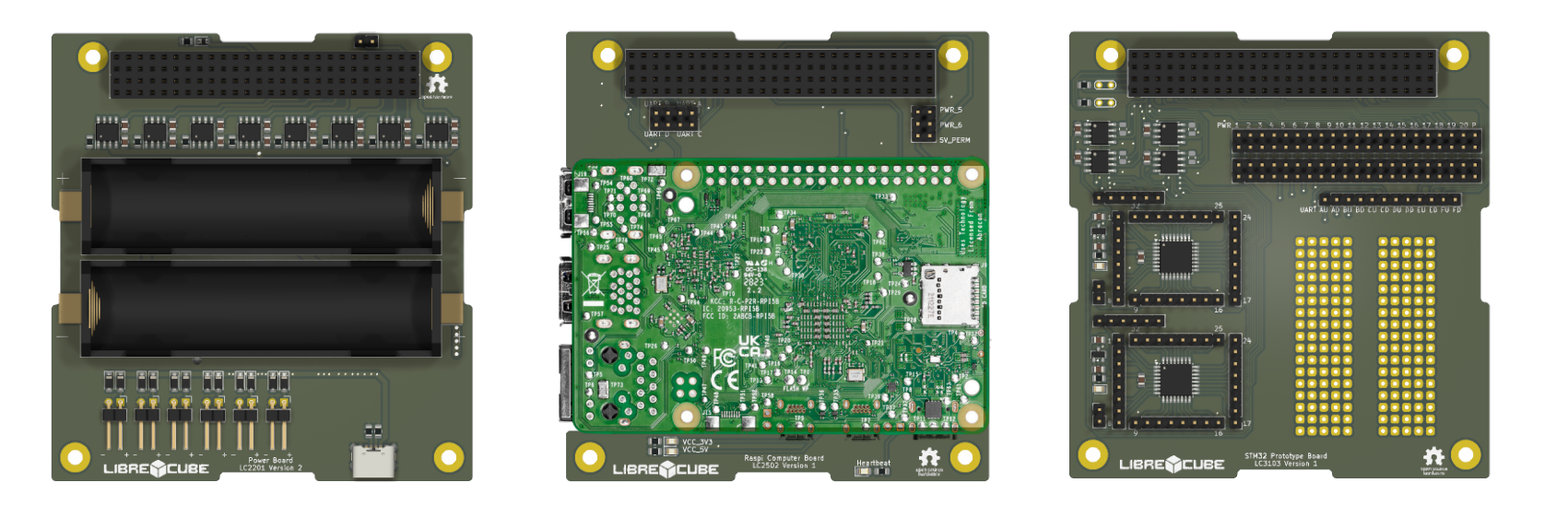
Not shown in the picture is the software. We would use the Python Onboard Software to run on the computer board and several LibreCube software modules, such as python-spacecan and micropython-spacecan for the monitoring and control between onboard computer and prototype board.
3. Build and assemble your system
The repositories contain a build folder that contains the artifacts and instructions on how to build the component. For hardware projects this typically is a bill of materials and some files for manufacturing (such as STEP files for CNC, STL files for 3D print, or Gerber files for PCB production). For software projects the build folder may contain compiled source code.
In our example, you would need to produce the PCB boards and do the soldering. The assembly however is pretty easy: Simply stack the boards on top of each other.
4. Modify your system (as needed)
Likely you will need to modify some parts of the system. Every repository contains a src folder, which contains the source files, such as KiCAD files, FreeCAD files, or software source code. You can freely modify them for your purpose.
At a minimum for our example you will need to write the portion the firmware of the prototype board to interface your sensor. Also, you will need to write the code to enable the onboard computer to control and monitor your sensor board (ie. the prototype board with your sensor on it).
5. Test and extend your system
Finally, you want to run extensive testing with your completed system. How you do this is mostly up to your mission requirements and other aspects. LibreCube has a number of "Ground Support Equipment" components that can support your testing activities.
Thanks to the modularity of LibreCube boards, you can easily swap boards or extend your system with more functionality. For example, you may want to house the electronics board stack in a structure (such as the 1U Structure). And perhaps you may want to add a WiFi Communications Board?
Support
Check out the Tutorials for more hands-on exercises with LibreCube components. Also read about the Reference Architecture to understand the bigger picture of LibreCube ecosystem.
If you have found a bug or other issue in a project, you can directly create an issue in the relevant repository. Alternatively write us an email (info@librecube.org) or let us know through the chat.
Have a look at our website for details on how to reach us.
For feature requests, please write us an email with relevant details.
Frequently Asked Questions
Can I purchase ready-made components?
LibreCube is a registered non-profit organization that does not engage in commercial activities. However, if you intend to purchase components of the LibreCube ecosystem and need commercial support, write us an email and we will get you in contact with our commercial partners. Also, send us an email if you are interested to become vendor of LibreCube products.
I am looking for system XYZ, where to find it ?
All our projects are make available at our GitLab account. To get an understand of how projects are named, and therefore help you navigate the repositories, have a look at the LibreCube reference architecture.
When will LibreCube develop and publish system XYZ ?
We are successively extending the LibreCube ecosystem to build ever more advanced systems to carry out complex missions. If you feel that a system or payload is currently urgently missing, please send us an email.