Workflow
The typical workflow to contribute to LibreCube projects is:
- Pick an open issue to work on. If there is no issue yet for the bug fix or feature you want to implement, then create said issue first. Be very specific in the description of the issue. Also, add suitable labels to it.
- Assign yourself to the issue to indicate that you are working on it.
- Create a branch for this issue. See section below.
- Do your work and do regular commits. See section below.
- When you are done with your work or want to discuss the code, open a merge request. A merge request is a good place to discuss the change and review the code. As long as your merge request is not ready for merging, mark it as draft.
Branching
We use different branching schemes for software and hardware projects.
Branching Rules for Software Projects
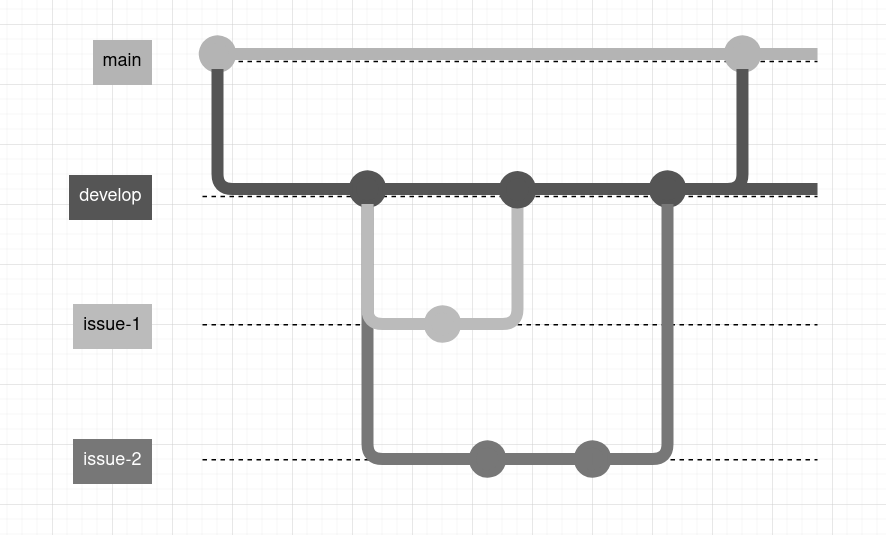
The main branch contains the latest version of the project and is tested and runnable. It is protected, meaning that only repository maintainers can merge to it. Exceptionally, urgent fixes may be applied directly to main.
The develop branch is work the development is happening. Branches for features and bug fixes start off from the latest develop branch and are named issue-x, where x is the number of the issue that was raised in the repository.
Issue branches are then merged back into develop when complete, using merge requests.
Finally, the develop branch is merged into main as stable releases at the discretion of the repository maintainers, and labeled with version tags.
Branching Rules for Hardware Projects
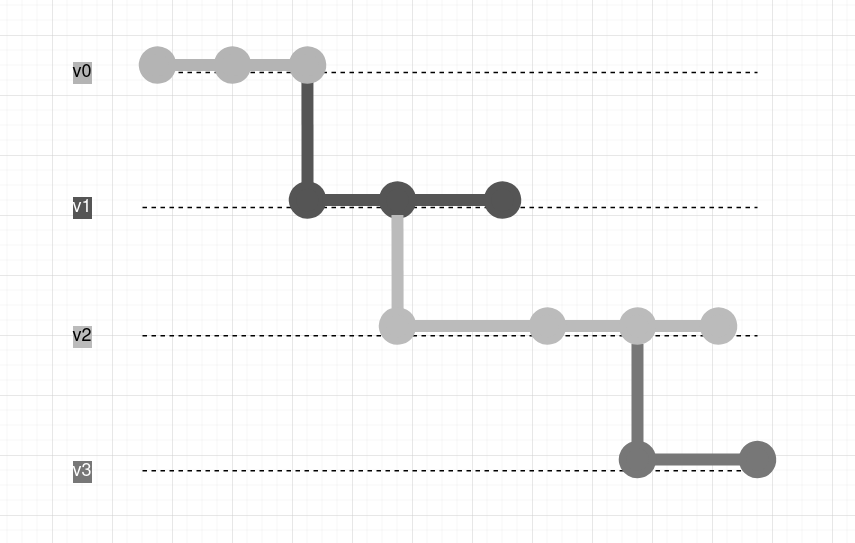
For hardware projects there is no main branch. The branches are named v0 (prototype), v1, v2, and so on. All version branches are protected.
To work on a feature or fix something for a specific version, create a branch from it and name it like issue-x, similar as for software branching.
Issue branches are then merged back into the relevant version branch when complete, using merge requests.
This way, different versions of the hardware can be maintained and evolve in parallel.
Commits
This section is inspired by Conventional Commits.
Write your commit messages in present tense and start with the commit type. Add a semicolon ";" if there is more than one sentence.
[feat]: The new feature you're adding to a particular application[mod]: A modification to the code that changes functionality[fix]: A bug fix or similar[refactor]: Code changes that improve structure without changing functionality[test]: Addition or modification of tests[docs]: Changes related to documentation[minor]: For really minimal changes that do not affect functionality
Example:
[fix] Wrong type conversion of sender's .emit() method
[feat] Add parameter `dist` to Entity class constructor
[test] Simulate loss of frames during UDP transport; Extend unit test cases
For minor changes, a simple commit [minor] is sufficient.
Rebasing
When working on your issue branch the branch you merged from may evolve due to other features and fixes being merged into it. To take those changes into your branch use git rebasing. You may apply this every time before starting working on your branch. The typical workflow is as follows:
- Go to origin brach and pull latest changes:
git switch <origin-branch>
git pull
- Go back to your branch:
git checkout <your-branch>
- Rebase with develop:
$ git rebase <origin-branch>
- Alternatively, run the rebasing in an interactive way:
$ git rebase -i <origin-branch>
- If merge issues are encountered (because conflicting changes were done in same files) you have to resolve them. Most IDEs provide a merge tools for this. Or use the command line:
$ git mergetool
- After fixing merge issues (if any) continue with rebase:
$ git rebase --continue
- If you make a mistake while merging, abort the merge to discard all changes you've made:
$ git rebase --abort
- Finally push changes to the remote repository. You need to force the push, since the commit history of the remote feature branch will be altered:
$ git push -f